Select a letter to copy it, then paste it into your text. Both uppercase and lowercase forms are available.
One click. Ready to paste.
Click a character, then paste with Ctrl+V or ⌘V.
Prefer to select and copy? Select the characters you need from this line: Ú ú Ù ù Û û Ü ü Ū ū
Quick copy úCommon forms 10Marks covered acute, grave, circumflex, diaeresis, and macron
CHARACTER GUIDE
Choose the right accented U
The common U forms on this page use an acute, grave, circumflex, diaeresis, or macron. Each character has its own Unicode value and spelling contexts.
Character
Mark
Example or use
Ú / ú
Acute
tú: you in Spanish.
Ù / ù
Grave
où: where in French.
Û / û
Circumflex
sûr: sure in French.
Ü / ü
Diaeresis or umlaut
München in German; pingüino in Spanish.
Ū / ū
Macron
tū: stand in Māori.
More U letters to copy
Copy U with a ring, ogonek, tilde, double acute, or Vietnamese horn and tone marks. The main characters above stay available for quick copying.
One click. Ready to paste.
Click a character, then paste with Ctrl+V or ⌘V.
Other marks: Ů/ů has a ring above, Ų/ų has an ogonek below, Ũ/ũ has a tilde, and Ű/ű has a double acute. These are different characters, not substitutes for ü.
Vietnamese U with horn: Ư/ư is a distinct vowel letter. Its tone-marked forms include Ứ/ứ (acute), Ừ/ừ (grave), Ử/ử (hook above), Ữ/ữ (tilde), and Ự/ự (dot below).
The code table and typing methods on this page cover the original ten common forms.
KEYBOARD METHODS
How to type u with accent
01 / WINDOWS ALT CODES
Use the numeric keypad
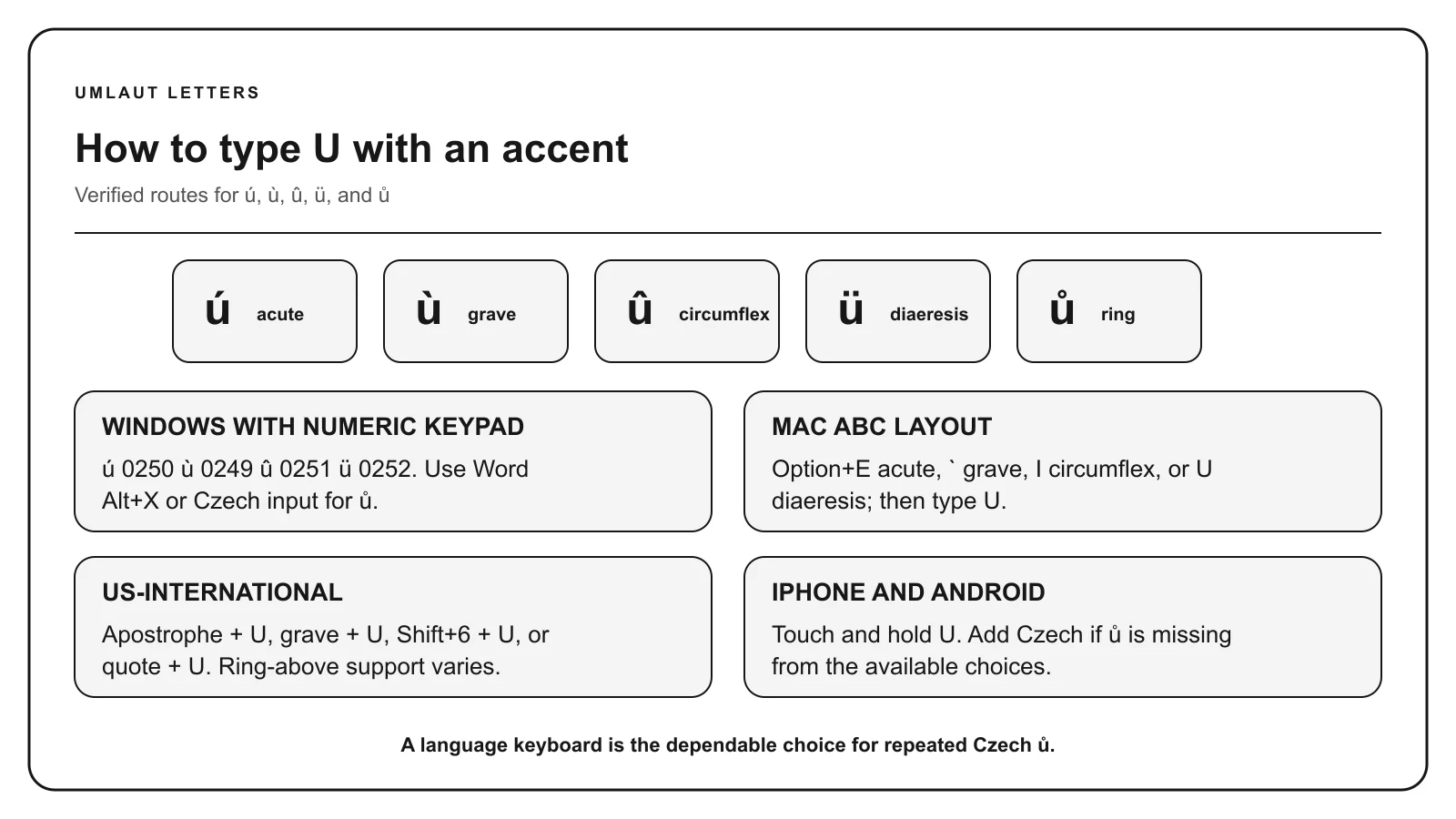
Turn Num Lock on. Hold Alt, enter all four digits on the numeric keypad, then release Alt.
ú / Ú
0250 / 0218
ù / Ù
0249 / 0217
û / Û
0251 / 0219
ü / Ü
0252 / 0220
Include the leading zero. The number row is not a numeric keypad. These legacy codes depend on Windows and the active character set; use Character Map or Word Unicode conversion for forms without a listed Alt code.
With the US or ABC input layout, press the first combination, release both keys, then type lowercase u:
ú:Option + E, release, then u.
ù:Option + `, release, then u.
û:Option + I, release, then u.
ü:Option + U, release, then u.
Hold Shift with the final letter for uppercase. In supported apps, holding U opens an accent menu. Use Character Viewer for forms absent from that menu, such as ū. Other input layouts may use different keys.
03 / IPHONE, IPAD & ANDROID
Touch and hold U
Keep your finger on U, slide to the accented character, then release. Switch to uppercase before holding the key for a capital letter.
Available forms depend on the keyboard and enabled languages. Add a language keyboard that supports a missing letter, or copy the exact character above.
04 / WORD & INTERNATIONAL KEYBOARDS
Convert a Unicode code or use dead keys
In Microsoft Word for Windows, type 00FA and press Alt + X for ú. Omit U+. Select only the code before converting if another letter or number immediately precedes it. Find other values in the character-code table.
With the US-International keyboard enabled, type apostrophe then U for ú, grave then U for ù, Shift + 6 then U for û, or quotation mark then U for ü. The exact dead keys depend on the active layout.
Microsoft Word
For ú, press Ctrl + apostrophe, release, then u. For ū, use 016B then Alt+X in Word for Windows.
On desktop, choose Insert → Symbols → Special characters. Search by the letter and mark, then select the exact result. For one known letter, copying is usually quicker.
Use an international or language keyboard for repeated writing. ChromeOS also supports Unicode entry with Ctrl+Shift+U, the hexadecimal code, then Enter.
Use dead keys for common U accents. For ū, use a suitable language layout, Word 016B followed by Alt+X, or copy the character.Open full-size diagram
CHARACTER REFERENCE
U with accent codes
Letter
Mark
Unicode
Windows Alt
HTML named
HTML decimal
Ú
Acute
U+00DA
Alt+0218
Ú
Ú
ú
Acute
U+00FA
Alt+0250
ú
ú
Ù
Grave
U+00D9
Alt+0217
Ù
Ù
ù
Grave
U+00F9
Alt+0249
ù
ù
Û
Circumflex
U+00DB
Alt+0219
Û
Û
û
Circumflex
U+00FB
Alt+0251
û
û
Ü
Diaeresis or umlaut
U+00DC
Alt+0220
Ü
Ü
ü
Diaeresis or umlaut
U+00FC
Alt+0252
ü
ü
Ū
Macron
U+016A
Not standard
Ū
Ū
ū
Macron
U+016B
Not standard
ū
ū
Paste the character itself into normal text. HTML entities belong in HTML source. Unicode labels use hexadecimal notation, while HTML decimal entities and Windows Alt codes use decimal numbers.
MEANING & SPELLING
Using u with accent correctly
Spanish uses ú to mark stress in words such as tú. French uses ù in a small number of words, including où, and û in words such as sûr. German uses ü as an umlaut, while Spanish uses the same two-dot shape as a diaeresis in words such as pingüino.
In German, ü represents a different vowel from u and can be written ue when the umlaut is technically unavailable. That replacement does not apply to Spanish, Turkish, or every other language that uses ü.
The macron in ū often marks vowel length, including in Māori and some transliteration systems. Always follow the spelling and capitalization used by the original source.
Ü and Ú use different marks
Ü has two dots, while Ú has a single acute accent rising to the right. Ù uses a grave accent, Û uses a circumflex, and Ū uses a horizontal macron. These characters are not interchangeable.
COMMON QUESTIONS
Questions about u with accent
What is the difference between ú and ü?
Ú has an acute accent. Ü has two dots that may function as an umlaut or diaeresis depending on the language. Use the form found in the original spelling.
How do I type an accented U on Windows without a numeric keypad?
Copy the letter from this page, use Character Map, or enable a US-International keyboard for repeated typing. In Microsoft Word for Windows, type the hexadecimal Unicode code without U+ and press Alt+X. For example, 00FA becomes ú and 016B becomes ū. The Word method does not require a numeric keypad and does not work in every Windows app.
Can I write ue instead of ü?
Use ue as a fallback for German ü when the actual character is unavailable. Do not apply that replacement automatically in names or other languages.
How do I type ú on a phone?
Touch and hold U on the on-screen keyboard, then slide to ú. If it is missing, add a language keyboard that supports the character or copy it from this page.
Related U guides
Choose a guide only when you need spelling or typing details beyond copying the character.