Quotation marks wait for another key
An international dead-key layout is active. Press the quote key followed by Space, or switch to the ordinary layout.
TYPING GUIDE / KEYBOARD LAYOUTS
Choose between a language keyboard and an international dead-key layout, then learn how to type accents without disrupting punctuation.
Use a language-specific layout when you write one language often. Use an international layout when you keep a US-style key arrangement but need common Western European accents. Dead keys wait for the next letter, so press the mark key followed by Space when you want the punctuation itself.
METHOD SELECTOR
The best method depends on how often you type the character, whether you know its name or code, and which input layout is active. Use this table as a starting point, then follow the detailed instructions below.
| Situation | Best starting method | Why |
|---|---|---|
| Daily writing in one language | Native language layout | Complete alphabet, punctuation, and familiar conventions |
| Occasional Western European accents | US International | Common dead-key combinations on a familiar base layout |
| Many specialized Latin characters | Extended or compose-key layout | Broader repertoire with learnable sequences |
| One isolated character | Copy and paste | No layout change or memorization |
A native language layout is designed around a particular writing system. It provides that language’s letters and punctuation directly or through standard modifier keys. This is usually the best choice for complete sentences, spelling accuracy, and a consistent workflow.
An international layout keeps much of a US key arrangement while turning punctuation keys into dead keys for acute, grave, circumflex, tilde, and diaeresis combinations. It is convenient for several Western European languages but may not cover every Czech, Polish, Romanian, Turkish, or Vietnamese character.
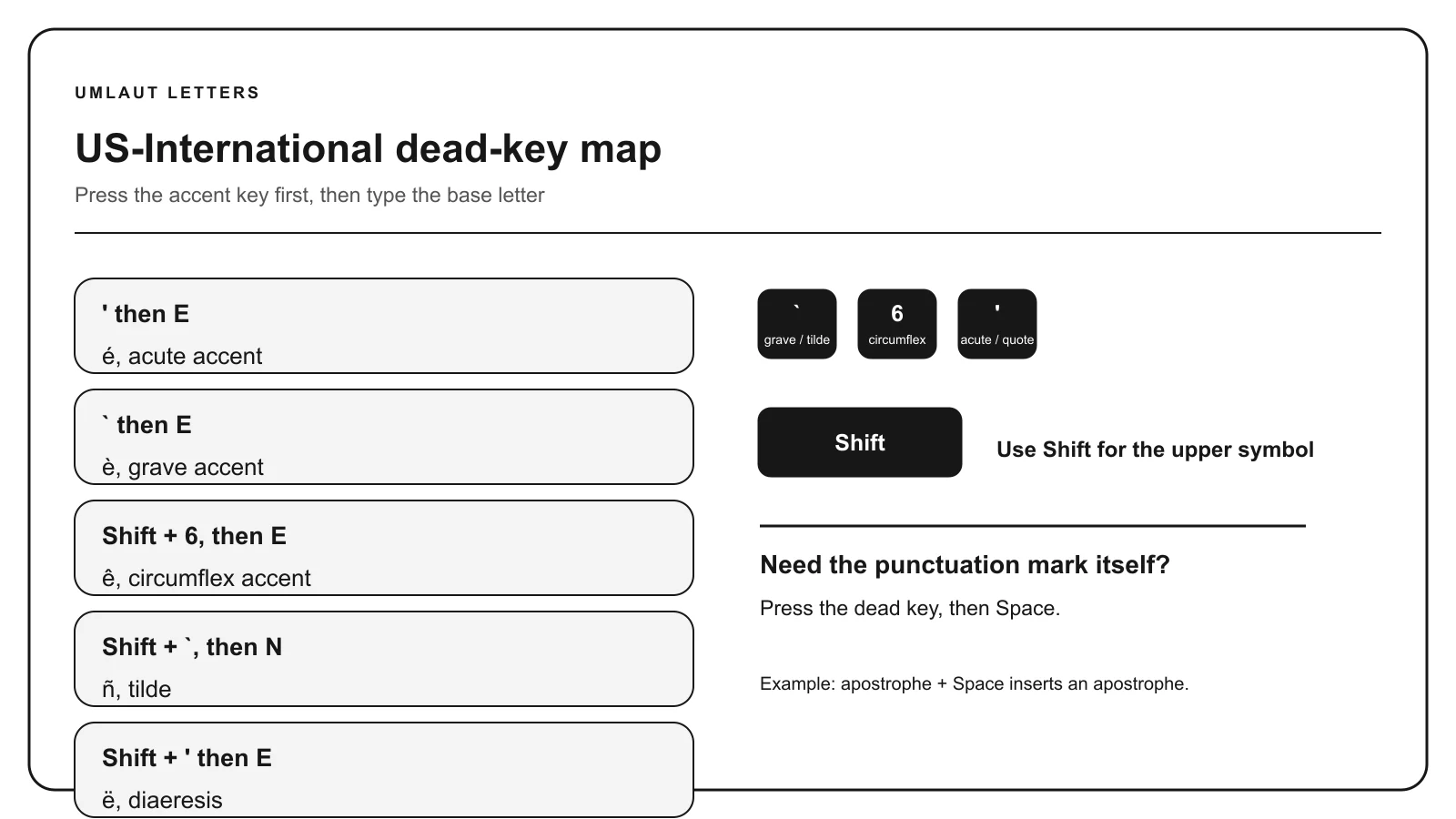
Press the accent key first, then the compatible base letter. On US International, apostrophe plus E commonly produces é, grave plus A produces à, quotation mark plus U produces ü, and tilde plus N produces ñ. Exact mappings depend on the operating system and selected layout.
A dead key does not insert punctuation immediately. Press Space after it when you need the standalone apostrophe, quotation mark, grave symbol, caret, or tilde.
Windows manages keyboards under Time & language and commonly switches with Windows key plus Space. ChromeOS manages input methods under Languages and inputs and documents Ctrl+Shift+Space. macOS manages Input Sources and can show Keyboard Viewer for the active mapping.
Keep only the layouts you use regularly if accidental switching becomes a problem. The visible layout indicator is the fastest way to diagnose changed punctuation or unexpected letters.
For frequent writing, choose one primary layout and practice a short test string containing every special letter you need. Save verified substitutions only where the language permits them. A German ae fallback, for example, is not a universal replacement rule for all accented A forms.
For multilingual work, combine a broadly useful layout with copy pages or the accent keyboard for uncommon characters. That keeps common input fast without requiring you to memorize a large custom layout.
TROUBLESHOOTING
An international dead-key layout is active. Press the quote key followed by Space, or switch to the ordinary layout.
Confirm that the instructions match the active operating system and input layout.
Install that language’s native layout or use a broader extended layout rather than inventing substitutions.
Check the system shortcut and remove unused layouts if they are not needed.
COMMON QUESTIONS
It is an input layout designed to produce characters from several languages, often through dead-key combinations.
No. It is convenient for many Western European accents, but native layouts better cover complete language-specific sets.
Press the apostrophe dead key and then Space.
No. It changes the characters the keys produce, not the labels printed on the hardware.
References: Microsoft US International keyboard guidance, Google Chromebook keyboard help, Unicode Standard.