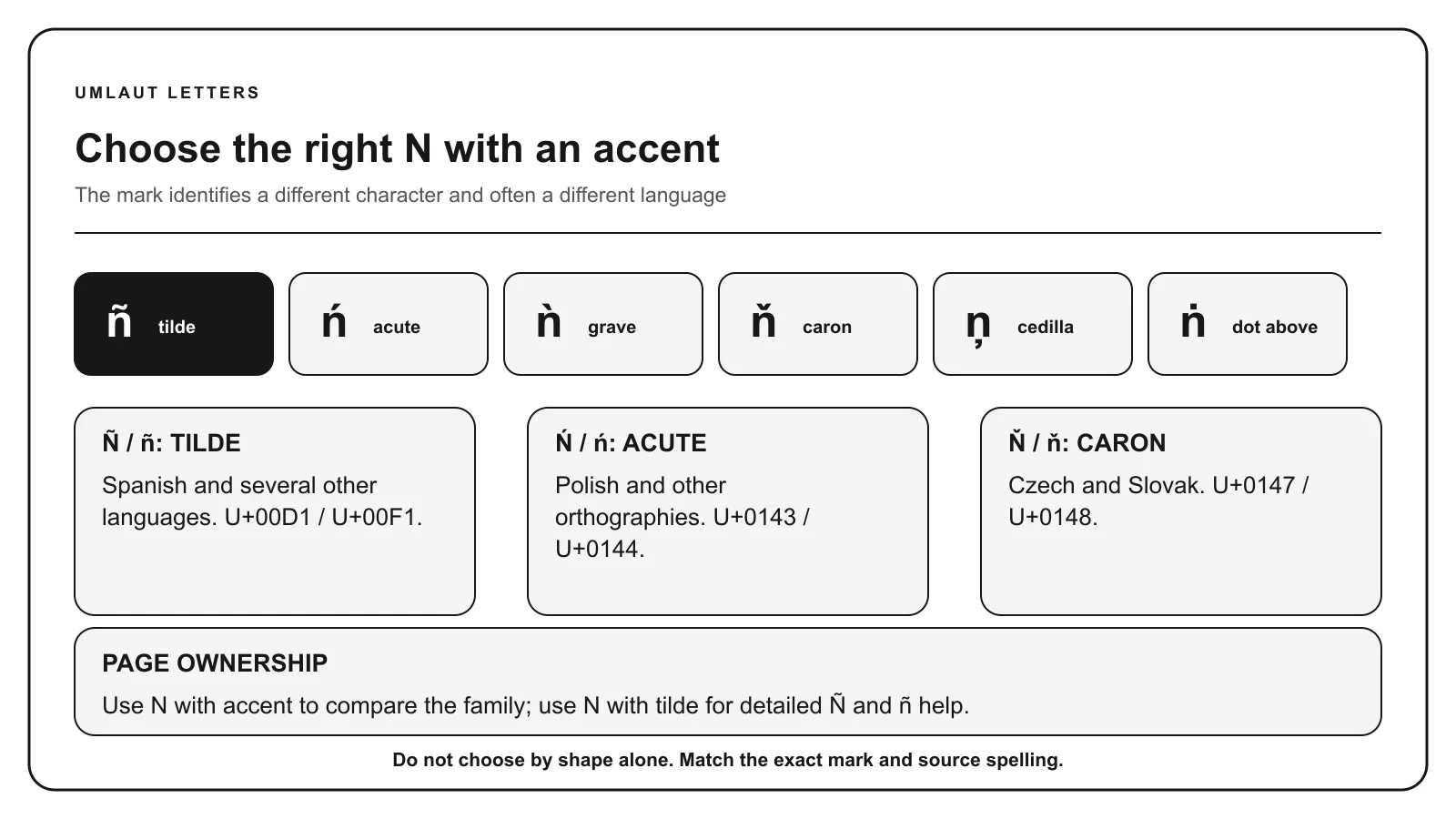
Not sure which mark you need? Compare the forms below before copying. For the Spanish letter, the N with tilde guide provides more detailed help.
One click. Ready to paste.
Click a character, then paste with Ctrl+V or ⌘V.
Prefer to select and copy? Select the characters you need from this line: Ñ ñ Ń ń Ǹ ǹ Ň ň Ņ ņ Ṅ ṅ Ṇ ṇ Ṉ ṉ Ṋ ṋ
Quick copy ñAvailable forms 18Marks covered tilde, acute, grave, caron, cedilla, dots, line below, and circumflex below
CHARACTER GUIDE
Choose the right accented N
Accented N characters are used in Spanish, Polish, Czech, Slovak, Latvian, Irish typography, transliteration, and other writing systems. The mark is part of the character, so match the original spelling rather than choosing by appearance alone.
Character
Mark
Example or use
Ñ / ñ
Tilde
niño: boy in Spanish.
Ń / ń
Acute
koń: horse in Polish.
Ǹ / ǹ
Grave
ǹ: tone-marked syllabic N.
Ň / ň
Caron
kůň: horse in Czech.
Ņ / ņ
Cedilla
viņš: he in Latvian.
Ṅ / ṅ
Dot above
ṅ: transliteration letter.
Ṇ / ṇ
Dot below
ṇa: retroflex N in transliteration.
Ṉ / ṉ
Line below
ṉ: extended Latin character.
Ṋ / ṋ
Circumflex below
ṋ: specialist orthographic or transcription form.
KEYBOARD METHODS
How to type n with accent
01 / WINDOWS ALT CODES
Use the numeric keypad
Turn Num Lock on. Hold Alt, enter all four digits on the numeric keypad, then release Alt.
ñ / Ñ
0241 / 0209
Include the leading zero. The number row is not a numeric keypad. These legacy codes depend on Windows and the active character set; use Character Map or Word Unicode conversion for forms without a listed Alt code.
With the US or ABC input layout, press the first combination, release both keys, then type lowercase n:
ñ:Option + N, release, then n.
Hold Shift with the final letter for uppercase. In supported apps, holding N opens an accent menu. Use Character Viewer for forms absent from that menu, including specialist N characters. Other input layouts may use different keys.
03 / IPHONE, IPAD & ANDROID
Touch and hold N
Keep your finger on N, slide to the accented character, then release. Switch to uppercase before holding the key for a capital letter.
Available forms depend on the keyboard and enabled languages. Add a language keyboard that supports a missing letter, or copy the exact character above.
04 / WORD & INTERNATIONAL KEYBOARDS
Convert a Unicode code or use dead keys
In Microsoft Word for Windows, type 0144 and press Alt + X for ń. Omit U+. Select only the code before converting if another letter or number immediately precedes it. Find other values in the character-code table.
On Windows US-International, press Shift + grave for the tilde dead key, release, then type n for ñ. Apostrophe then n does not produce ń on this layout. Use a Polish keyboard, Character Map, or 0144 followed by Alt+X in Word for Windows for ń.
0144 is hexadecimal Unicode notation for ń, not a Windows numeric-keypad Alt code. Do not substitute Alt+324.
Microsoft Word
For ń, use 0144 then Alt+X. For ñ, Word also supports Ctrl+Shift+tilde, release, then n.
On desktop, choose Insert → Symbols → Special characters. Search by the letter and mark, then select the exact result. For one known letter, copying is usually quicker.
Use an international or language keyboard for repeated writing. ChromeOS also supports Unicode entry with Ctrl+Shift+U, the hexadecimal code, then Enter.
Compare the marks before copying. For Spanish Ñ and ñ, see the N with tilde guide linked below.Open full-size diagram
CHARACTER REFERENCE
N with accent codes
Letter
Mark
Unicode
Windows Alt
HTML named
HTML decimal
Ñ
Tilde
U+00D1
Alt+0209
Ñ
Ñ
ñ
Tilde
U+00F1
Alt+0241
ñ
ñ
Ń
Acute
U+0143
Not standard
Ń
Ń
ń
Acute
U+0144
Not standard
ń
ń
Ǹ
Grave
U+01F8
Not standard
Not listed
Ǹ
ǹ
Grave
U+01F9
Not standard
Not listed
ǹ
Ň
Caron
U+0147
Not standard
Ň
Ň
ň
Caron
U+0148
Not standard
ň
ň
Ņ
Cedilla
U+0145
Not standard
Ņ
Ņ
ņ
Cedilla
U+0146
Not standard
ņ
ņ
Ṅ
Dot above
U+1E44
Not standard
Not listed
Ṅ
ṅ
Dot above
U+1E45
Not standard
Not listed
ṅ
Ṇ
Dot below
U+1E46
Not standard
Not listed
Ṇ
ṇ
Dot below
U+1E47
Not standard
Not listed
ṇ
Ṉ
Line below
U+1E48
Not standard
Not listed
Ṉ
ṉ
Line below
U+1E49
Not standard
Not listed
ṉ
Ṋ
Circumflex below
U+1E4A
Not standard
Not listed
Ṋ
ṋ
Circumflex below
U+1E4B
Not standard
Not listed
ṋ
Paste the character itself into normal text. HTML entities belong in HTML source. Unicode labels use hexadecimal notation, while HTML decimal entities and Windows Alt codes use decimal numbers.
MEANING & SPELLING
Using n with accent correctly
Spanish ñ is a separate alphabet letter called eñe. Polish ń represents a different sound from plain n. Czech and Slovak use ň, while Latvian uses ņ. Dotted and underlined N forms appear mainly in particular orthographies or transliteration systems.
A broad N reference is useful when the user knows the base letter but cannot identify the mark. If you specifically need the Spanish letter, the focused N with tilde page provides Spanish spelling, enye terminology, and device instructions in greater depth.
Unicode includes both precomposed letters and combining sequences. For ordinary names and words, the precomposed character shown here is usually easiest to copy. A visually identical combining sequence can contain more than one code point, which matters in search, validation, and character limits.
Ñ, Ń, Ǹ, and Ň are not interchangeable
Ñ has a tilde, Ń has an acute accent, Ǹ has a grave accent, and Ň has a caron. Ņ carries a cedilla below the letter. Each has a different Unicode value and belongs to different spelling systems.
COMMON QUESTIONS
Questions about n with accent
What accents can appear on N?
Common forms include N with tilde, acute, grave, caron, and cedilla. Unicode also includes N with a dot above, dot below, and line below.
Is ñ the same as n with an accent?
N with accent is a broad search description. In Spanish, ñ is a separate letter called eñe, not an optional decoration on n.
How do I type ń in Microsoft Word?
Type 0144 and press Alt+X for lowercase ń. Type 0143 and press Alt+X for uppercase Ń.
Why does ņ sometimes look like N with a comma?
Fonts commonly shape the Latvian mark beneath lowercase letters like a comma. The encoded character is still named N with cedilla in Unicode.
Should I copy a precomposed N or add a combining mark?
Use the precomposed character when it exists and matches the required spelling. Combining marks are useful for combinations that do not have a single precomposed character.