Text shows é instead of é
The bytes were decoded with the wrong encoding. Make the saved file, response header, and parser agree on UTF-8.
TYPING GUIDE / WEB TEXT
Use UTF-8, literal Unicode characters, HTML character references, and normalization correctly when accented text moves through a website.
Declare UTF-8 and write the literal character whenever your files and response headers use UTF-8. An HTML named, decimal, or hexadecimal character reference can represent the same character in HTML source, but it is not required for ordinary accented text. Normalize text only when your application needs a consistent representation.
METHOD SELECTOR
The best method depends on how often you type the character, whether you know its name or code, and which input layout is active. Use this table as a starting point, then follow the detailed instructions below.
| Situation | Best starting method | Why |
|---|---|---|
| Modern HTML document | Literal UTF-8 character | Readable source and direct Unicode text |
| Character is awkward in source | HTML character reference | Represents the same character during HTML parsing |
| JavaScript string | Literal character or Unicode escape | HTML entities are not decoded in ordinary JavaScript strings |
| Comparing or indexing text | NFC normalization | Reduces differences between common equivalent sequences |
Save HTML, CSS, JavaScript, and data files as UTF-8. Put the charset declaration near the start of an HTML document and configure the server to send the matching Content-Type charset. A mismatch between the declared and actual encoding can turn readable accents into replacement symbols or garbled sequences.
W3C internationalization guidance recommends UTF-8 for content. Copying é into a correctly configured UTF-8 document is normally preferable to hiding it behind a numeric reference.
The literal é, the named reference é, the decimal reference é, and the hexadecimal reference é resolve to the same precomposed character in HTML. Named references are case-sensitive and only exist for a defined set, while numeric references can address any valid Unicode code point.
Use references when they make source entry safer or when representing syntax-sensitive characters such as an ampersand. Do not paste the text é into a document, message, JSON value, or ordinary JavaScript string expecting every system to decode it.
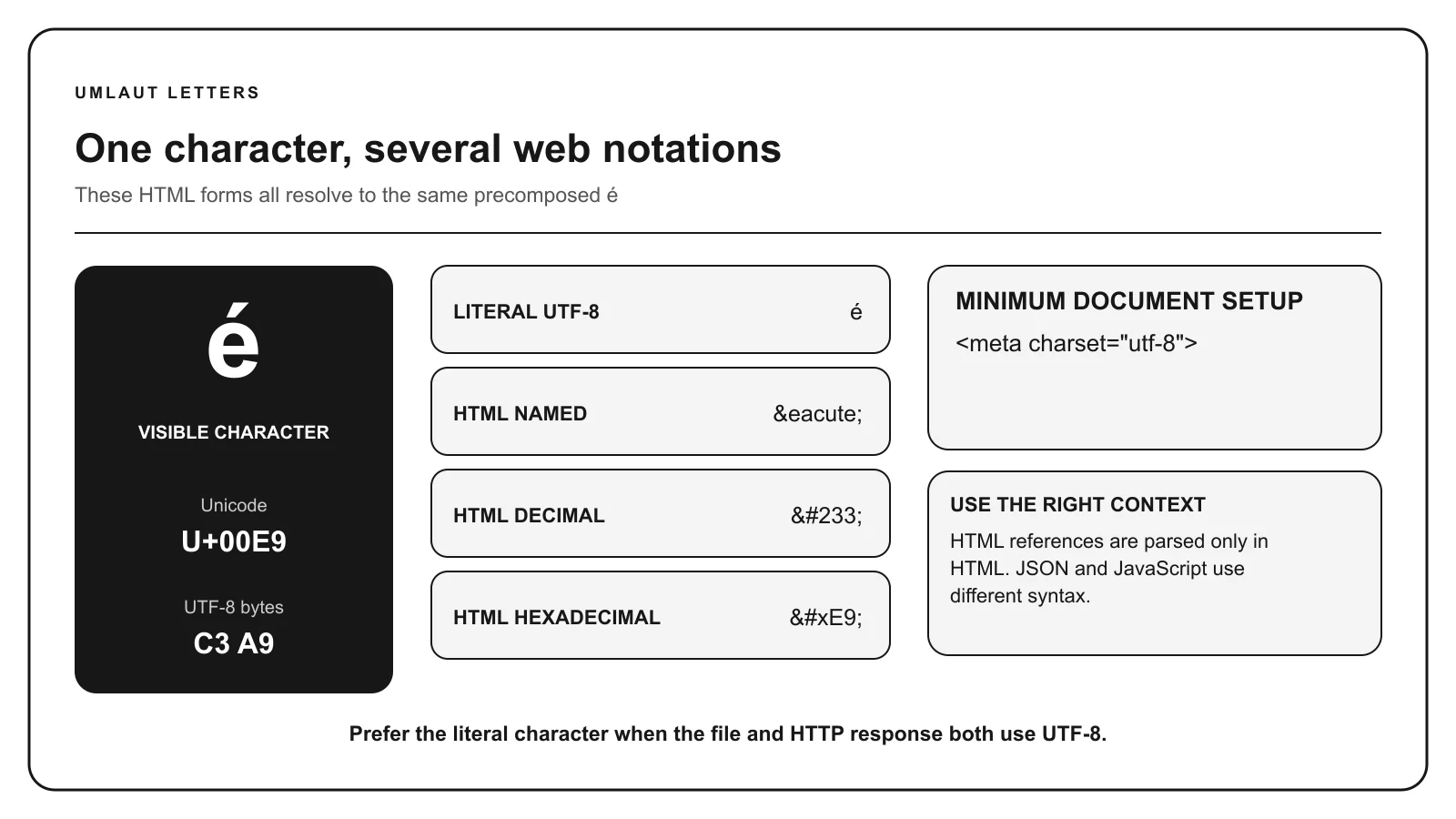
Character references are HTML syntax. The clipboard and the visible document should usually contain the actual Unicode character.
Unicode values are conventionally written in hexadecimal with U+, such as U+00E9 for é. An HTML decimal reference writes the decimal number 233, while a hexadecimal reference writes E9 after &#x. The digits look different because the numeral systems differ.
CSS and JavaScript have their own escape syntaxes. Confirm the syntax for the language and context instead of copying an HTML entity into every source file.
The precomposed é can be stored as U+00E9. A canonically equivalent sequence can store U+0065 followed by U+0301. They often render alike, but byte-level comparison, search, validation, filenames, and string length can differ.
NFC generally composes common sequences, while NFD decomposes them. NFKC and NFKD also apply compatibility mappings and can change distinctions that matter to an application. Normalize at a defined boundary and preserve the original when exact archival fidelity is required.
TROUBLESHOOTING
The bytes were decoded with the wrong encoding. Make the saved file, response header, and parser agree on UTF-8.
The value is outside HTML parsing or the ampersand was escaped. Insert the Unicode character or use the correct syntax for that context.
Inspect their code points and compare consistently normalized values, commonly NFC.
The character can be valid even when the font lacks its glyph. Test a font with suitable script coverage.
COMMON QUESTIONS
No. Literal characters are appropriate when the document and server use UTF-8.
Both resolve to precomposed é in HTML. One is decimal and the other is a named reference.
Normalize where consistent comparison or storage requires it. Compatibility normalization should be chosen carefully because it can erase distinctions.
Unicode supports combining marks, so a base letter and accent can be stored separately while remaining canonically equivalent to a precomposed form.
References: W3C character encoding guidance, Unicode normalization forms, Unicode Standard.