PRACTICAL CHARACTER GUIDE
Why accents disappear when copying text
The clipboard usually preserves Unicode text. When an accent disappears after pasting, the change often happens in the destination form, import process, font, or encoding pipeline.
01
Start by locating the stage that changed the text
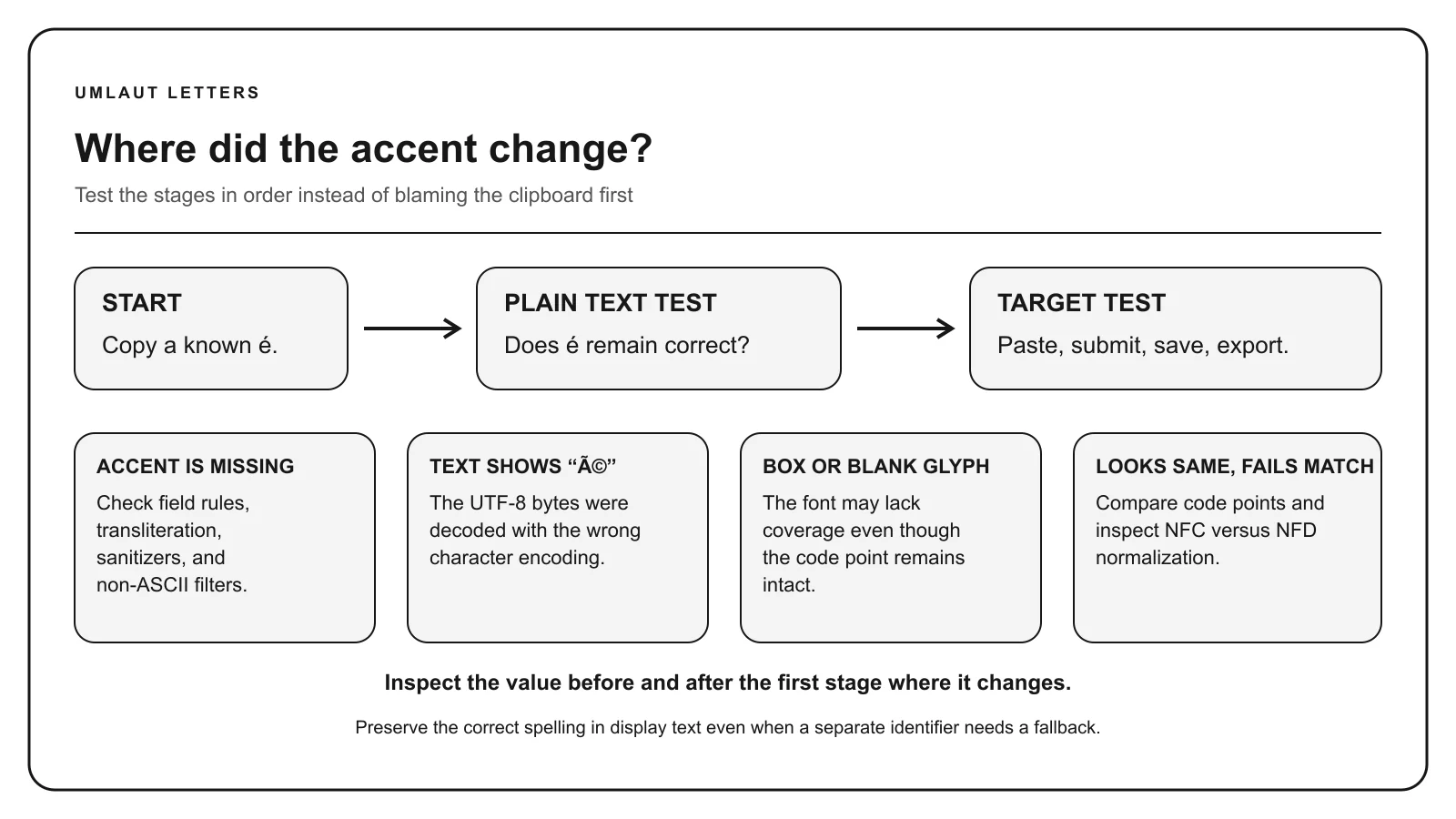
Copy a known character such as é and paste it into a plain text editor, the target form, and a second modern application. If only one destination changes it, the clipboard is probably not the cause. The destination or a later save step is transforming the value.
Compare what you typed, what the field displays, what a confirmation page shows, and what a downloaded or emailed record contains. These are separate stages. A form can display the accent correctly and strip it only when validating or exporting the submission.
02
The form may allow only a restricted character set
Legacy identity, airline, financial, and government systems sometimes accept only a defined subset of characters. A validation rule may reject accented text, transliterate it, or silently retain only ASCII letters. That behavior is a product policy, not a limitation of Unicode.
Follow the destination’s documented name rules. Do not remove marks from a person’s name simply to make a form pass unless the responsible organization specifies the substitute. Keep the correctly spelled original in systems that support it.
03
Encoding errors usually create garbled text
If é becomes é, UTF-8 bytes were probably interpreted as a different legacy encoding. If the result becomes a replacement diamond or question mark, a decoder may have encountered invalid or unavailable input. Ensure that files, database connections, HTTP headers, and parsers agree on UTF-8.
HTML entities do not repair a broken data pipeline. An entity is decoded only in an HTML parsing context. JSON, plain text, database values, email headers, and JavaScript strings each follow their own encoding and escaping rules.
04
A font can hide a character without deleting it
A square, blank space, or fallback shape can mean the selected font lacks a glyph. Copy the value into a character identifier or a broadly supported font. If the code point remains correct, change the font rather than replacing the character.
Combining marks also depend on shaping quality. A base letter and mark may be present but positioned awkwardly. Vietnamese stacked marks are a strong test of font and rendering support because several visual elements can belong to one grapheme.
05
Sanitizers and transformations can strip marks
Search slugs, username generators, spam filters, old CSV exports, optical character recognition, and custom cleanup functions may intentionally remove combining marks. A common implementation decomposes text and deletes all marks, which changes words and names even when it produces a convenient URL.
Separate machine identifiers from display text. A URL slug can use a documented transliteration while the page heading and database record preserve the correct spelling. Audit any regular expression that removes non-ASCII characters or Unicode mark categories.
06
Use a short diagnostic sequence
First, reproduce the change with one known character. Second, inspect the original and result with the identifier. Third, determine whether the change occurs on paste, blur, submit, storage, export, or display. Fourth, inspect encoding declarations, validation, transformation code, and font coverage at that stage.
Normalization can make equivalent sequences consistent, but it should not erase an accent. NFC and NFD preserve canonical meaning. If a mark truly vanishes, a separate transliteration, filtering, corruption, or unsupported-data step is involved.
- Test a plain editor and the target side by side
- Inspect code points before and after
- Verify UTF-8 across every boundary
- Review validators and sanitizers
- Preserve the correct display spelling
Continue with the right reference
Sources: W3C: Choosing and applying a character encoding, Unicode normalization FAQ.